> ## Documentation Index
> Fetch the complete documentation index at: https://docs.rownd.io/llms.txt
> Use this file to discover all available pages before exploring further.
# Authentication methods
> Configure what sign-in methods are used in your app and websites
Authentication should not be a tax on your growth. With Rownd's adaptive authenication and wide range of authentication options, we help maximize both product flexibility and increase user growth.
## Navigating to authentication methods
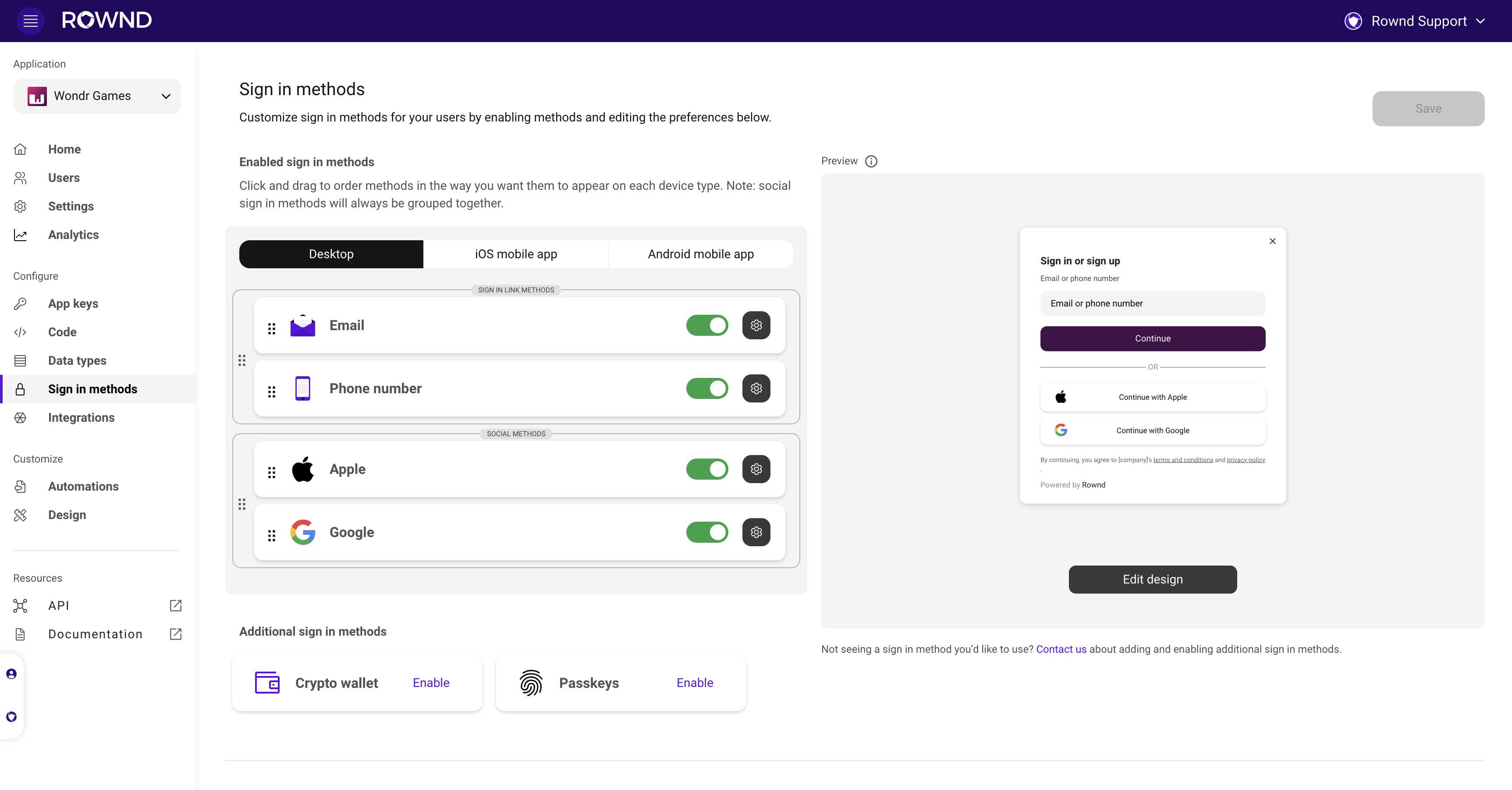
Open your app in the [Rownd platform](https://app.rownd.io/applications). Then click on the **Sign-in methods** tab on the left to adjust your flow.
 ## Available authentication methods
You can use any combination of the following authentication methods:
Passwordless sign-in with a passkey (biometrics)
Passwordless email sign-in
One tap sign-in with a Google account
Fast sign-in with Apple ID
Passwordless SMS-based sign-in
}
href="./guests"
>
Anonymous sign-in for unidentified users
When detected, sign in using Metamask, Coinbase, etc.
Get in touch to discuss your needs!
## Adaptive sign-in with Rownd
Rownd's adaptive sign-in feature offers a tailored authentication experience for users by adapting the sign-in method depending on the user's device. This versatile approach ensures the most convenient and secure authentication option is presented, enhancing the user experience and promoting increased user engagement.
### Device-specific sign-in methods
Rownd's adaptive sign-in can detect the user's device and adjust the available authentication options accordingly. This ensures that the user is presented with the most appropriate sign-in method for their device, resulting in a seamless and intuitive experience. Some device-specific sign-in methods include:
* **Biometric authentication:** Rownd utilizes passkey technology to automatically utilize whatever biometric featuers a device has. For devices with biometric capabilities, such as fingerprint or facial recognition, Rownd can offer these secure and convenient methods as authentication options.
* **Device-based authentication:** For users with device-specific accounts (e.g., Apple ID or Google accounts), Rownd can present the option to sign in using these platform-specific accounts.
* **SMS or email authentication:** For devices without biometric or device-based options, Rownd can provide authentication via SMS or email, sending a unique, one-time-use login link to the user's mobile device or email address.
### Customizing sign in methods by device on the Rownd platform
1. **Navigate to the Sign in methods tab:** After installing Rownd with a code snippet or SDK, navigate to the sign in methods tab in the Rownd Platform.
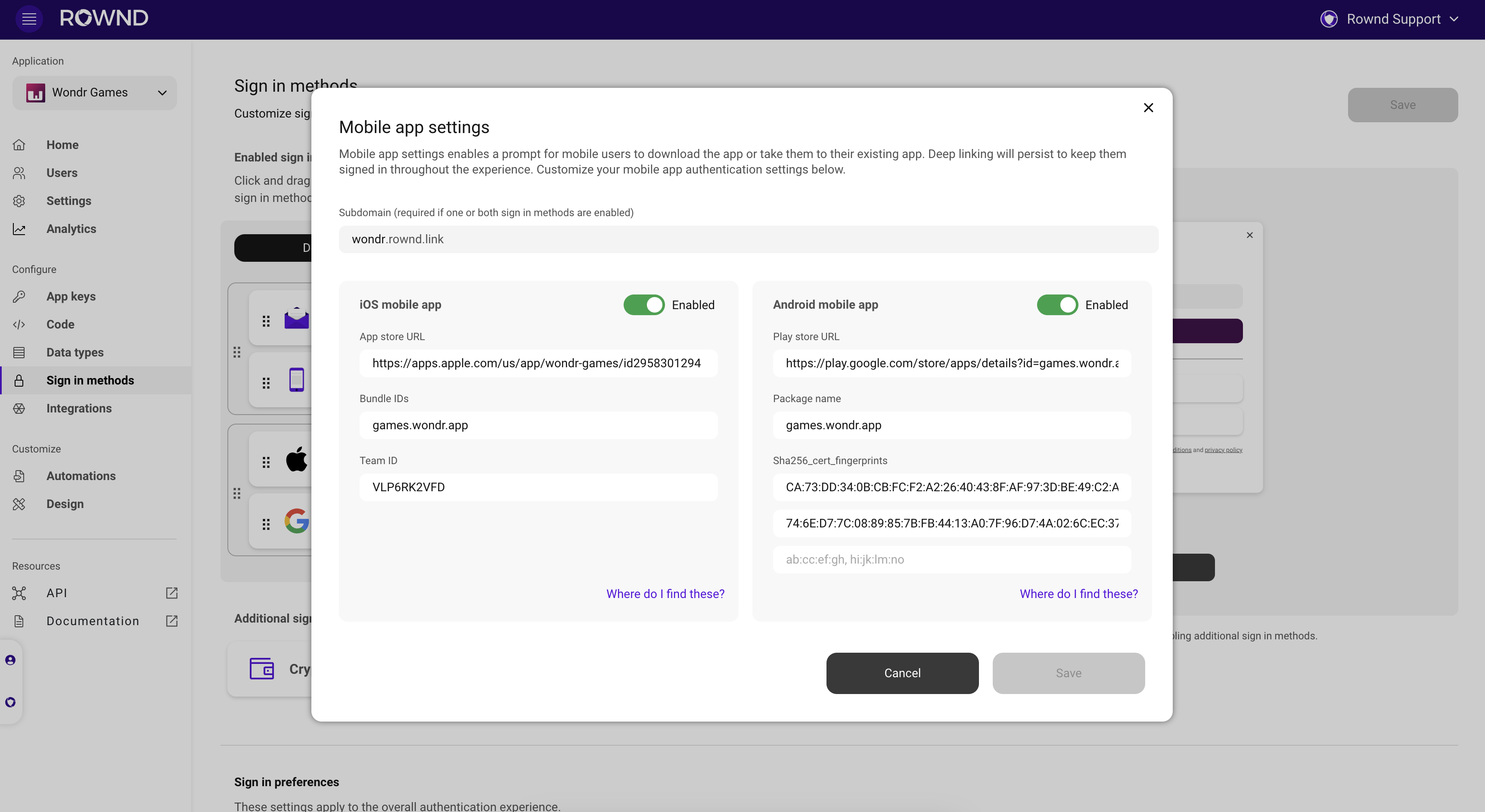
2. **Configure [mobile app settings](configuration/mobile.mdx):** If you have a mobile app, configure your Google, Apple and mobile settings to get started. This will ensure proper deep linking to your mobile apps with your new customizations.
## Available authentication methods
You can use any combination of the following authentication methods:
Passwordless sign-in with a passkey (biometrics)
Passwordless email sign-in
One tap sign-in with a Google account
Fast sign-in with Apple ID
Passwordless SMS-based sign-in
}
href="./guests"
>
Anonymous sign-in for unidentified users
When detected, sign in using Metamask, Coinbase, etc.
Get in touch to discuss your needs!
## Adaptive sign-in with Rownd
Rownd's adaptive sign-in feature offers a tailored authentication experience for users by adapting the sign-in method depending on the user's device. This versatile approach ensures the most convenient and secure authentication option is presented, enhancing the user experience and promoting increased user engagement.
### Device-specific sign-in methods
Rownd's adaptive sign-in can detect the user's device and adjust the available authentication options accordingly. This ensures that the user is presented with the most appropriate sign-in method for their device, resulting in a seamless and intuitive experience. Some device-specific sign-in methods include:
* **Biometric authentication:** Rownd utilizes passkey technology to automatically utilize whatever biometric featuers a device has. For devices with biometric capabilities, such as fingerprint or facial recognition, Rownd can offer these secure and convenient methods as authentication options.
* **Device-based authentication:** For users with device-specific accounts (e.g., Apple ID or Google accounts), Rownd can present the option to sign in using these platform-specific accounts.
* **SMS or email authentication:** For devices without biometric or device-based options, Rownd can provide authentication via SMS or email, sending a unique, one-time-use login link to the user's mobile device or email address.
### Customizing sign in methods by device on the Rownd platform
1. **Navigate to the Sign in methods tab:** After installing Rownd with a code snippet or SDK, navigate to the sign in methods tab in the Rownd Platform.
2. **Configure [mobile app settings](configuration/mobile.mdx):** If you have a mobile app, configure your Google, Apple and mobile settings to get started. This will ensure proper deep linking to your mobile apps with your new customizations.
 3. **Customize sign in method orders by device:** Select the device type at the top (Desktop, iOS, Android), drag, drop, prioritize, and hide methods until you’re liking your customizations for each device type. We recommend prioritizing Apple sign in on iOS devices and prioritizing Google sign in on Android devices.
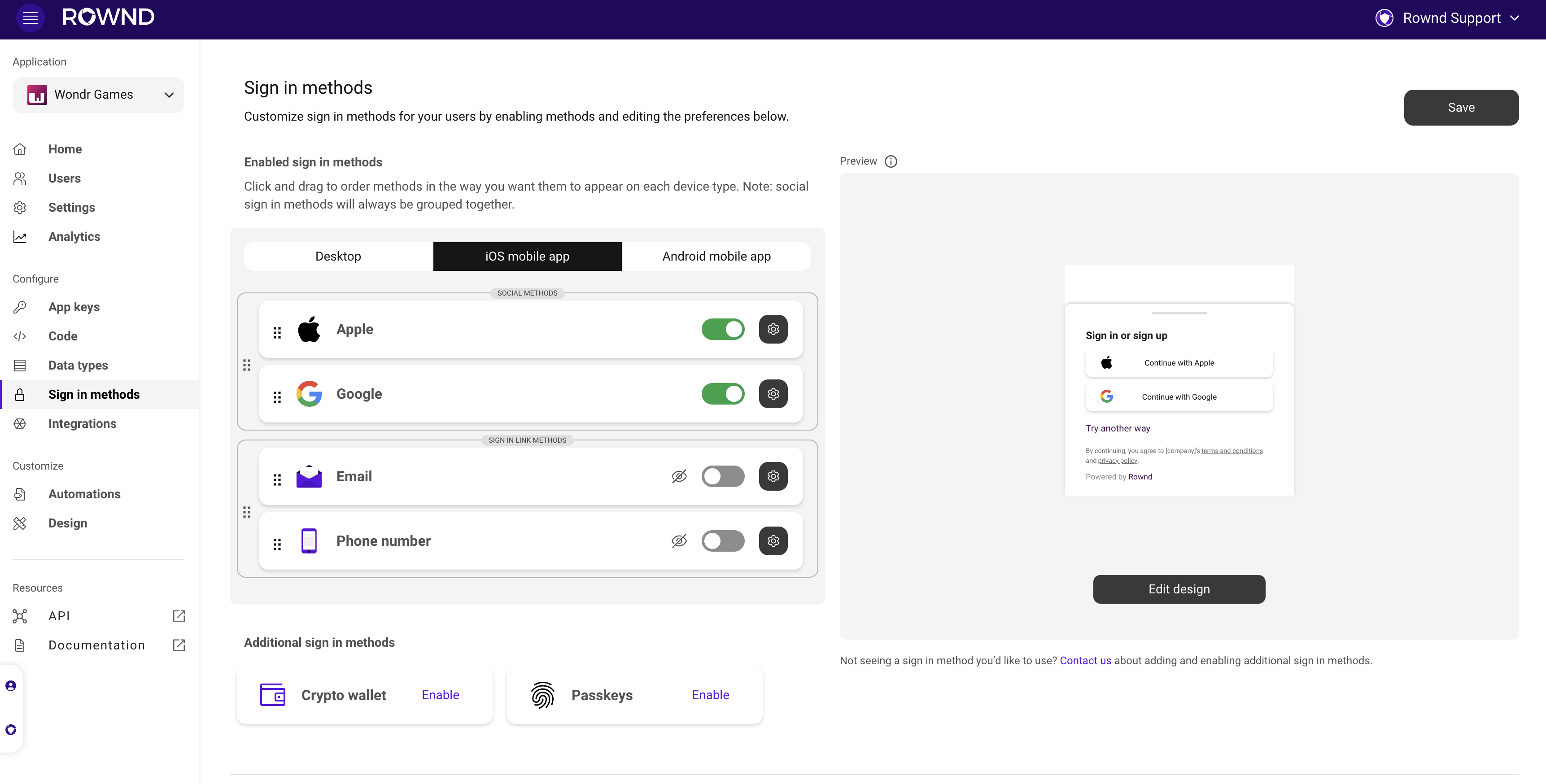 4. **Test it out:** Save and try out your new customizations in your app! Continue to iterate based on on the way your users are signing in.
### Benefits of adaptive sign-in
Implementing Rownd's adaptive sign-in feature in your mobile app provides several advantages:
1. **Improved user experience:** By offering device-specific sign-in methods, you can cater to users' preferences and provide a more convenient and intuitive authentication process.
2. **Increased security:** Adaptive sign-in ensures that the most secure method available on the user's device is presented, helping to safeguard user accounts and protect sensitive data.
3. **Higher engagement and retention:** A tailored authentication experience can lead to higher user engagement and retention, as users are more likely to continue using an app that offers a seamless and convenient sign-in process.
## Unverified Users
See more details on [Unverified Users](/configuration/authentication-methods/unverified)