> ## Documentation Index
> Fetch the complete documentation index at: https://docs.rownd.io/llms.txt
> Use this file to discover all available pages before exploring further.
# iOS configuration
> Preparing your iOS app to work with Rownd
Configure Rownd for iOS mobile devices including ([React Native](/sdk-reference/mobile/react-native) and [Flutter](/sdk-reference/mobile/flutter)). This configuration will allow multiple Rownd services to work in the iOS operating system like [Universal Links](/configuration/mobile/overview#what-are-universal-links) and [Passkeys](/configuration/authentication-methods/passkeys).
### 1. Configure in Rownd Platform
1. Select **Sign-in methods** from the left navigation menu.
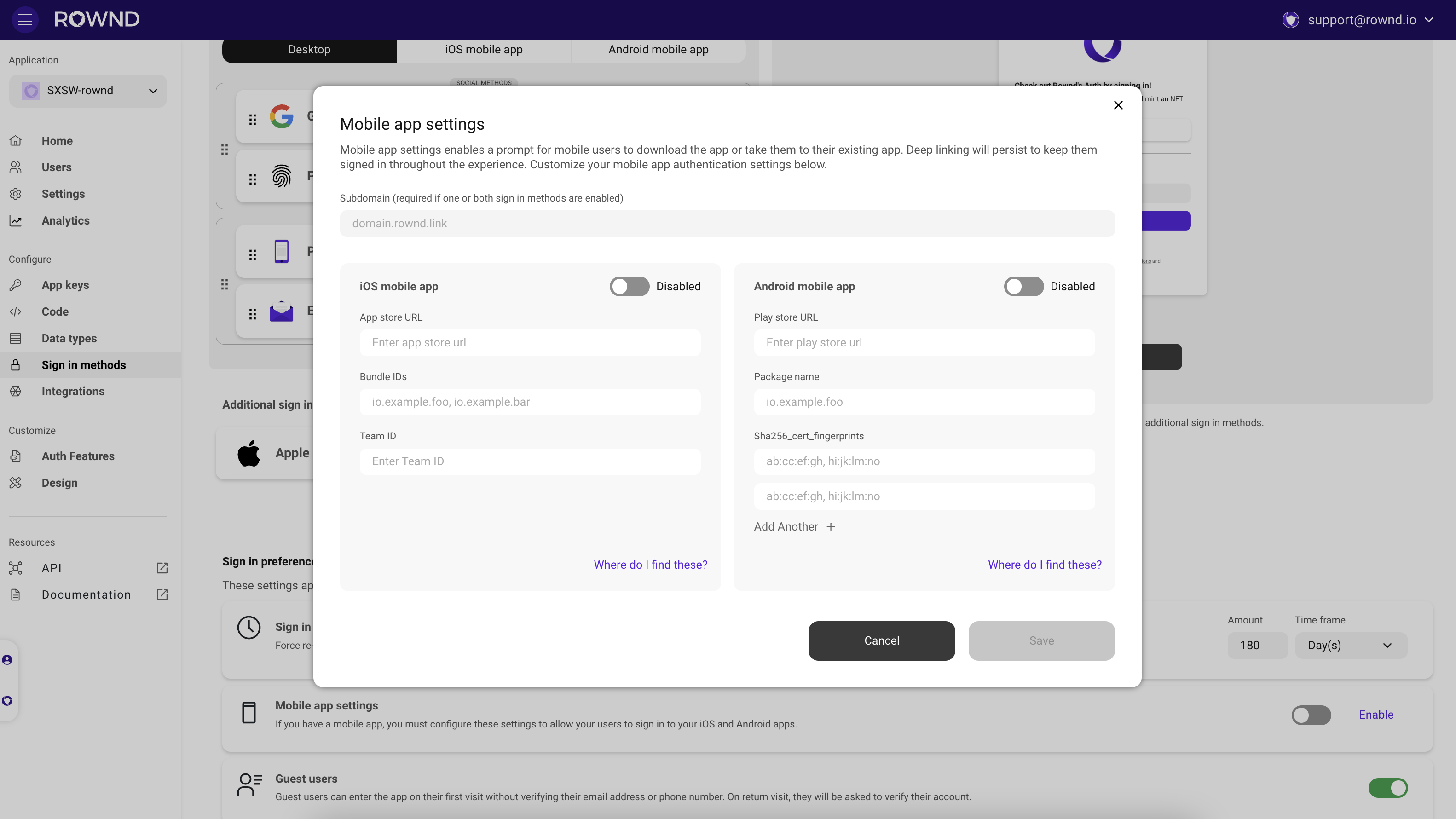
2. In the Sign-in preferences section, locate [**Mobile app settings**](/configuration/mobile/mobile-app-settings)
3. Fill out mobile app settings for iOS
* Subdomain (e.g., myapp for myapp.rownd.link - the .rownd.link portion is added automatically).
* App store URL - The direct link to your app in the Apple App Store
* Bundle IDs - A comma-separated list of bundle IDs for your app (e.g., `com.example.myapp`)
* Team ID - The team ID for your app as shown in the [Apple Developer Portal](https://developer.apple.com/account) (e.g., `15GKOXA3H6`)
4. Ensure iOS is **enabled** and hit **save**
 ### 2. Configure in project (Xcode or entitlements file)
#### Using Xcode
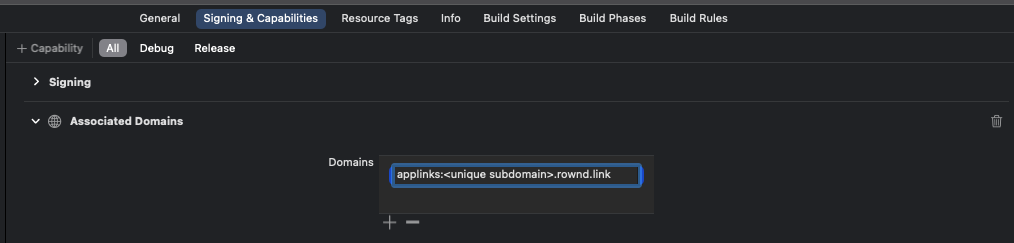
1. In your Xcode project, select your app from the left, then navigate to Targets > Signing & Capabilities
2. Add Associated Domains as a capability
3. Add the subdomain to the applinks entitlement. `applinks:.rownd.link`
### 2. Configure in project (Xcode or entitlements file)
#### Using Xcode
1. In your Xcode project, select your app from the left, then navigate to Targets > Signing & Capabilities
2. Add Associated Domains as a capability
3. Add the subdomain to the applinks entitlement. `applinks:.rownd.link`
 #### Using entitlements file
file: `ios/[appName]/[appName].entitlement`
```xml theme={null}
...
com.apple.developer.associated-domains
...
subdomain.rownd.link
```
#### Using entitlements file
file: `ios/[appName]/[appName].entitlement`
```xml theme={null}
...
com.apple.developer.associated-domains
...
subdomain.rownd.link
```